
Optimus Alarm Clock Plus1.5.3 - Google Play
You'll be able to see results in few seconds.
Publisher Description
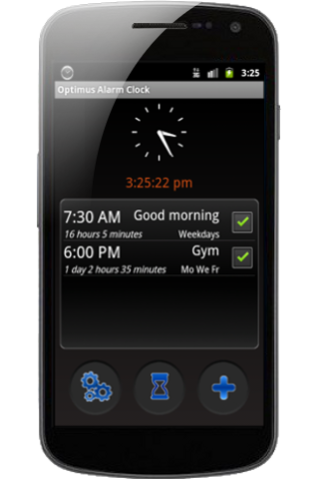
This is the AD FREE version.
Optimus Alarm Clock is an alarm clock with many features and fully customizable so that anyone can choose how to wake up. You may prefer a soft tune up or maybe just the opposite.
Set it up your way and do not get up again on the wrong foot.
It also includes timer function, very useful for a nap or cooking.
★ Features ★
——————————–
☺ Ad Free
☺ Set as many alarms as you need.
☺ Recurrent alarms (weekdays, weekends, etc..) or one shot alarms.
☺ You can skip next occurrence of an alarm.
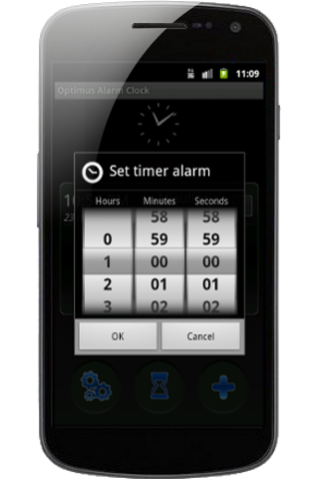
☺ Alarm timer: either to take a nap or to take food out of the oven, choose the time you want and a countdown will start until the alarm goes off.
☺ Choose from waking up to your favorite music or predefined alarms.
☺ Progressive volume fully configurable: you can choose the initial volume, the final volume and the time it takes to reach final volume.
☺ Alarm indicator icon in the notification bar with information about the next scheduled alarm.
☺ Configurable indicator on the screen lock: you know when the next alarm is scheduled even without unlocking your phone.
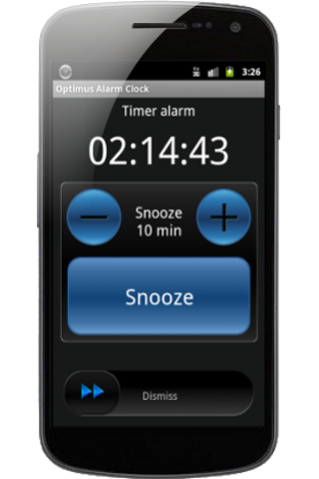
☺ Slider bar to turn off the alarm.
☺ Configurable snooze: increase or decrease the snooze time to your liking when the alarm sounds.
☺ Vibration optional.
☺ Choose your alarm time by turning the wheel picker.
☺ Customize the labels of your alarms.
Supported languages: English, Spanish, Croatian, Dutch, French, German, Italian, Portuguese and Serbian.
★ Support ★
Unfortunately it is almost impossible to develop an application like this that works on all available Android phones (which are many) perfectly. You can try the free version first and see if it works for you before purchasing this ad-free version.
Thank you!
About Optimus Alarm Clock Plus
The company that develops Optimus Alarm Clock Plus is Scappz Android. The latest version released by its developer is 1.5.3.
To install Optimus Alarm Clock Plus on your Android device, just click the green Continue To App button above to start the installation process. The app is listed on our website since 2016-08-08 and was downloaded 0 times. We have already checked if the download link is safe, however for your own protection we recommend that you scan the downloaded app with your antivirus. Your antivirus may detect the Optimus Alarm Clock Plus as malware as malware if the download link to com.scappz.alarmclockoptimusadfree is broken.
How to install Optimus Alarm Clock Plus on your Android device:
- Click on the Continue To App button on our website. This will redirect you to Google Play.
- Once the Optimus Alarm Clock Plus is shown in the Google Play listing of your Android device, you can start its download and installation. Tap on the Install button located below the search bar and to the right of the app icon.
- A pop-up window with the permissions required by Optimus Alarm Clock Plus will be shown. Click on Accept to continue the process.
- Optimus Alarm Clock Plus will be downloaded onto your device, displaying a progress. Once the download completes, the installation will start and you'll get a notification after the installation is finished.
Program Details
System requirements
Download information
Pricing
Version History
version 1.5.3
posted on 2016-08-08
- Patched a bug where some devices were having crashes. If you find a bug/crash, please send me an email to contact@scappz.com with information and how to reproduce the bug and I will try to fix it as soon as possible.,- Added option to set the check-boxes in the alarm list bigger.,- Fixed problem with the newer Android versions where the phone goes into "sleep mode" (Doze) and the alarm does not go off when it should.
Disclaimer
Official Google Play Link
We do not host Optimus Alarm Clock Plus on our servers. We did not scan it for viruses, adware, spyware or other type of malware. This app is hosted by Google and passed their terms and conditions to be listed there. We recommend caution when installing it.
The Google Play link for Optimus Alarm Clock Plus is provided to you by apps112.com without any warranties, representations or guarantees of any kind, so access it at your own risk.
If you have questions regarding this particular app contact the publisher directly. For questions about the functionalities of apps112.com contact us.
